


Keyboards are essential tools for both work and leisure, but they often accumulate dust, dirt, and grime over time. Cleaning your keyboard regularly is essential not just for hygiene but also for maintaining its performance. This detailed guide will walk you through how to clean keyboard and the steps to clean different types of keyboards—desktop, laptop, and mechanical—safely and effectively.
Why You Should Clean Your Keyboard?
Over time, keyboards can become filled with dust, crumbs, and other debris, leading to sticky or unresponsive keys. Additionally, a dirty keyboard can harbor harmful bacteria and germs, posing a health risk, especially in shared workspaces. Regular cleaning helps prevent malfunctions, improves the lifespan of your keyboard, and ensures a clean and comfortable working environment.
Materials Needed for Keyboard Cleaning
To clean your keyboard effectively, gather the following materials:
- A soft microfiber cloth
- Compressed air canister
- Cotton swabs
- Rubbing alcohol (preferably isopropyl alcohol with 70% or higher concentration)
- A small brush or toothbrush
- A keycap puller (for mechanical keyboards)
Precautions Before Cleaning
Before you begin cleaning your keyboard, take a few precautions:
- Unplug your keyboard: If you are cleaning a desktop keyboard, make sure it’s unplugged from your computer. For laptops, turn off the device to avoid unintentional keystrokes.
- Take a picture of your keyboard layout: If you plan to remove keys for a deep clean, taking a photo will help you reassemble it correctly.
- Work in a clean, well-lit area: This will help you spot dust and debris easily while cleaning.
How to Clean Keyboard?
Different types of keyboards exist, like desktop keyboards, laptop keyboards, and mechanical keyboards, and we need to follow different rules for each to protect certain areas of the hardware.
How to Clean a Desktop Keyboard?
Turn It Upside Down
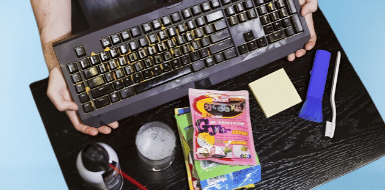
Flip the attachment so that the keys are facing downward and tap. Try holding the board at different angles and patting it firmly but softly across the entire surface to remove any loose particles. If you have a keyboard with replaceable keycaps (such as a mechanical keyboard), carefully remove them and shake the panel upside down again.
Brush Off the Muck
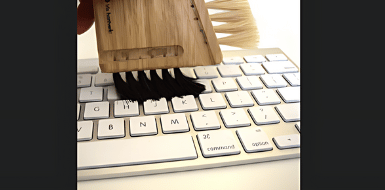
It’s time to use the brush to help sweep out the dirt beneath the QWERTY pattern. Use an old toothbrush to sweep if you don’t have any other option.
Blow Out Your Keyboard
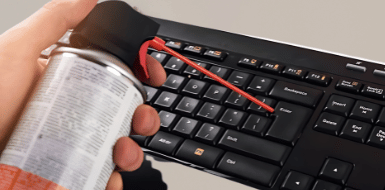
To clean between the keys, use a can of compressed air. Hold the keyboard upside down and spray short bursts of air between the keys to blow out any trapped dust or particles. For better results, tilt the keyboard at different angles while spraying. Use a microfiber cloth to remove dust and dirt.
Take Out the Cleaning Gel
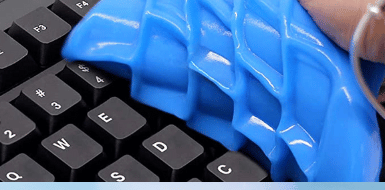
A pot of cleaning gel can be useful for eliminating dust from difficult-to-reach areas, but it is not suggested. Aside from its basic ickiness, it leaves a residue, becomes unclean, and deteriorates quickly, leaving you with a slimy mess that is not environmentally friendly.
How to Clean a Laptop Keyboard
Laptop keyboards are typically more delicate than desktop ones, so cleaning should be done carefully. Start using a microfiber cloth to wipe the surface, removing any dust or fingerprints. Use compressed air to blow out debris from between the keys, holding the laptop at a slight angle for best results.
For any sticky residue or spills, dampen a cotton swab with rubbing alcohol and gently clean between the keys. Be careful not to oversaturate the swab, as excess liquid can damage the internal components of your laptop.
How to Clean a Mechanical Keyboard
Mechanical keyboards, known for their durability and performance, require special attention during cleaning. First, unplug the keyboard and use a microfiber cloth to clean the surface. Use compressed air to remove dust and dirt between the keys.
For a more thorough cleaning, remove the keycaps using a keycap puller. Soak the keycaps in warm soapy water for about 30 minutes. While they dry, use a small brush and rubbing alcohol to clean the keyboard’s base and switches. Once the keycaps are completely dry, reattach them to the keyboard.
How to Clean a Keyboard After a Liquid Spill?
If you spill liquid on your keyboard, quick action is essential. Immediately turn off your device and unplug the keyboard. Tilt the keyboard to allow the liquid to drain out, then use a microfiber cloth to blot up as much liquid as possible. Let the keyboard dry thoroughly, ideally for 24-48 hours before using it again. If the spill was sticky, consider removing the keys for a deeper clean.
Maintaining Keyboard Hygiene
To keep your keyboard clean and functional, follow these maintenance tips:
- Clean regularly: Wipe your keyboard weekly with a microfiber cloth to prevent dust buildup.
- Avoid eating over your keyboard: Food crumbs can easily get lodged between the keys, causing malfunctions.
- Wash your hands before use: Clean hands transfer less dirt and oil to the keyboard.
- Use compressed air: Spray compressed air between the keys every few weeks to remove debris.
Common Mistakes to Avoid While Cleaning a Keyboard
While cleaning a keyboard seems simple, certain mistakes can cause permanent damage if you are not careful. Using excessive liquid is one of the most common errors, as moisture can seep into internal circuits and lead to malfunctioning keys. Scrubbing too hard or using sharp objects to remove debris may scratch key surfaces or dislodge components.
Another mistake is reconnecting or powering on the keyboard before it has completely dried, which increases the risk of short circuits. Avoid household cleaners with harsh chemicals, as they can fade key labels and damage protective coatings. By cleaning gently and patiently, you can protect your keyboard while keeping it fresh and responsive.
Conclusion
Cleaning your keyboard regularly is essential for its performance, as well as for maintaining a hygienic workspace. By following the simple steps outlined in this guide about how to clean keyboard, you can keep your desktop, laptop, or mechanical keyboard in top condition. Whether you’re doing a light surface clean or a deep cleaning session, the right materials and techniques will ensure your keyboard stays functional and looks great. Regular maintenance is the key to preventing long-term damage and ensuring a pleasant typing experience.
Apart from that if you want to know about “Top 5 Benefits of Door-to-Door Auto Transport” then please visit our “Technology” Category.
FAQs
It is recommended that you clean your keyboard every few months or more frequently if you notice obvious dirt or crumbs.
You can use the disinfectant wipes, but make sure the wipes are not too moist. Check the guidelines first because some wipes could be excessively harsh and damage the text on the keys.
They are generally useful and safe for your keyboard. Just make sure you use a dedicated keyboard vacuum with mild suction to avoid any harm.
